A Comprehensive Guide To Building a Quick Commerce App For Your Business

Nirav Oza
Quick commerce (QCommerce) is rewriting the rules of online retail. Unlike traditional eCommerce, where deliveries take days, quick commerce promises ultra-fast fulfillment within 10–30 minutes. From groceries and medicines to electronics and snacks, customers now expect essentials to reach their doorstep almost instantly.
This booming model is powered by dark stores, micro-fulfillment centers, and AI-driven logistics that bring products closer to urban consumers. With global quick commerce projected to surpass $72 billion by 2025, businesses that embrace this model gain a competitive edge in customer experience, revenue, and retention.
In this guide, we’ll explore how quick commerce works, its comparison to traditional eCommerce, the business and revenue models behind it, development costs, and why now is the best time to invest in a QCommerce app.
What is Quick Commerce?
Quick commerce or QCommerce is an eCommerce model that is focused on delivering everyday essentials ultra-fast (10-30 minutes). This includes delivery of groceries, electronics, medicines, and snacks. Such deliveries are mostly under an hour and are made from “dark stores” located near a customer’s location.
Some of the key aspects of a quick commerce service are,
- Ultra-Fast Delivery- Delivering fast to customers, mostly under 60 minutes, is what quick commerce services aim to achieve.
- Curated Products- Leveraging artificial intelligence (AI) to offer smart product recommendations and ensuring minimal assortment, quick commerce apps offer curated product lists.
- Micro-Fulfilment Centres- Dark stores or micro-fulfilment centers are the backbone of a quick commerce service, ensuring quicker deliveries across categories.
- App-Based Operations- Using expert quick commerce app development, you can run the entire delivery operation on highly scalable applications.
Understanding How Quick Commerce Works in 2025
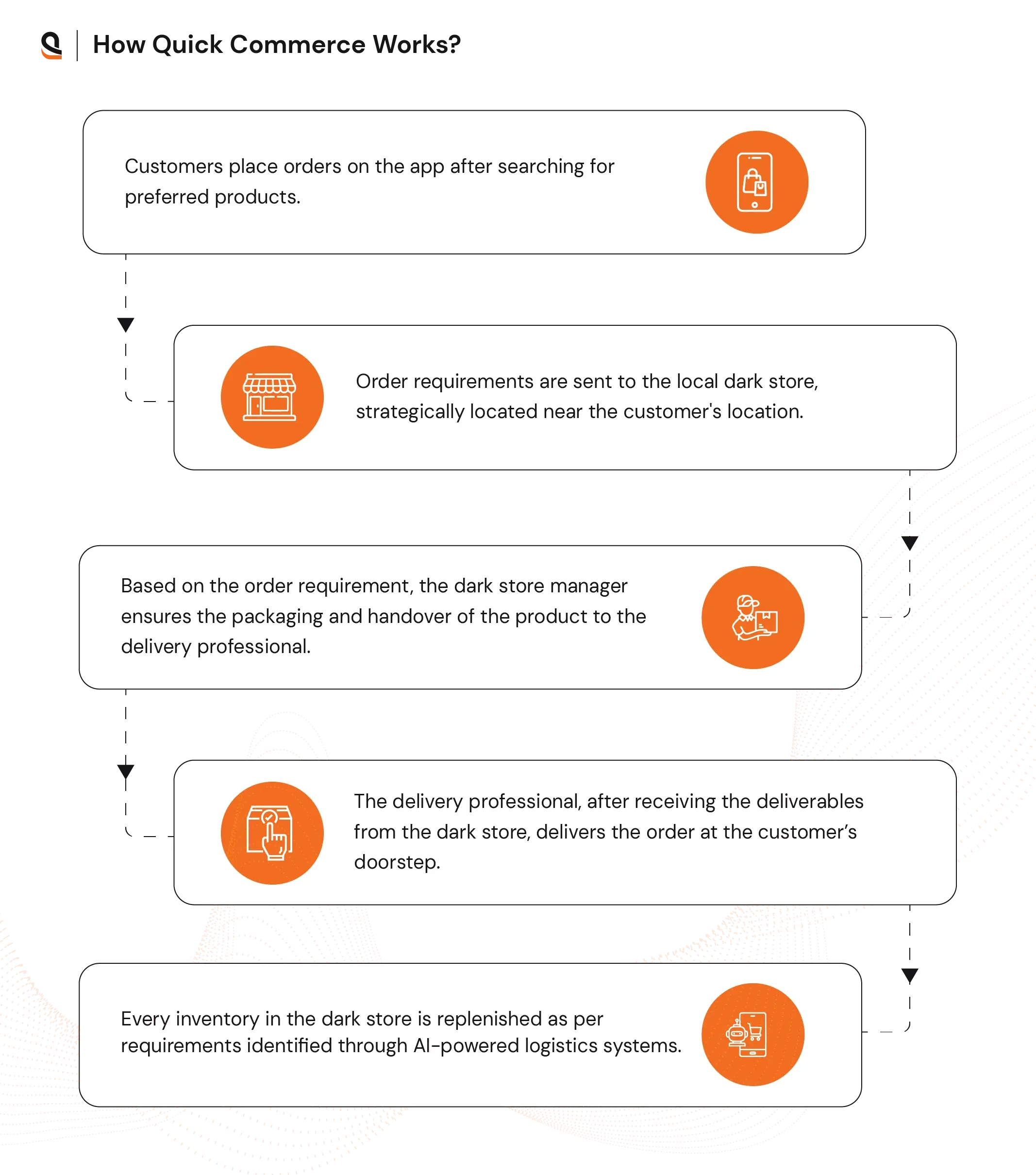
Quick commerce, or QCommerce, applications deliver products within minutes through dark stores, which are localized, small warehouses. These dark stores stock a wide range of popular products across various categories, including groceries, electronics, and apparel. Proximity to the customer’s location ensures faster deliveries.
Here is a step-by-step sequence on how quick commerce operations happen.
1. Customer Order – Customers search and place orders through the app.
2. Order Routing – Requirements are sent to the nearest dark store.
3. Store Fulfillment – Dark store manager handles packaging and handover.
4. Last-Mile Delivery – A Delivery professional brings the order to the doorstep.
5. Inventory Replenishment – AI-driven systems update stock in dark stores.
6. Quick Commerce vs eCommerce – Understanding how it differs from traditional models.
Quick Commerce vs. Traditional eCommerce: How Do Both Approaches Differ?
A comparison of quick commerce versus e-commerce stems from the fundamental difference in how both approaches work. While the eCommerce approach focuses on cost efficiency and offering a wider variety of products, quick commerce prioritizes speed and convenience.
Here is a table of differences between quick commerce and ecommerce
Now that it’s clear to you what quick commerce is and how it differs from the conventional eCommerce approach, let’s understand what the benefits of using this approach are for your business.
What Are the Benefits and Disadvantages of Quick Commerce?
If you consider the business perspective of any quick commerce app development, there are many benefits.
Here is a table of differences between quick commerce vs ecommerceBenefits
Now that you know what the key benefits of quick commerce are, let’s understand the different aspects you need to know to start a business. For example, first you will have to decide which business model to choose for your quick commerce app.

What Are the Top Quick Commerce Business Models?
Quick commerce business models used by businesses include inventory-led, hyperlocal marketplace, multi-vendor platform, omnichannel retailer-led, and aggregator models. Among these models, the most used ones are inventory-led, hyperlocal, and aggregator ones. For a deeper look at how these models are implemented in real-world scenarios, explore our eCommerce marketplace development case study.
Here are all the quick commerce business models that you can use.
These business models provide multiple revenue-generating options, including commissions, subscription fees, and advertising.
Revenue Models for Quick Commerce Apps
Here are some of the revenue models you can use for your QCommerce business.
- Commission Fees- You can charge commissions on each product sold on your platform.
- Listing Fees– You can charge a specific fee per listing of any product on your QCommerce app.
- Subscription Fees- You can charge customers directly for a subscription fee to access special discounts, free delivery on specific order values, and more.
- Advertisement- You can place ads for relevant products on your app and charge a specific fee to brands and other businesses.
- Data Analytics- You can offer customer insights to brands by leveraging data analytics solutions integrated into quick commerce apps.
You have decided what business and revenue model to use for your quick commerce app. Now it’s time to understand the process of creating such an application.
Must Read: How to Develop an App Like Airbnb for Your Business?How to Develop a Quick Commerce App?
Creating a quick commerce for your business needs significant planning and strategy. You need to ensure your app offers better access to features, rapid product discovery, and ease of payment.
Here is a step-by-step process for developing a quick commerce app for your business.
1. Define Your Model and Niche
Defining the niche and business model is crucial to your quick commerce app development plan. The business model you choose can impact not only the technology stack you will need but also the type of deliverables needed to start such a business.
For an aggregator model, you should list several local vendors and process orders. You also need a centralized dashboard that can help manage multiple vendors, along with their dedicated apps.
2. Focus on Features That You Need First
The next step is to build a wireframe that will allow you to visualize the quick commerce app and map user journeys. A key part of this step is to identify the features and plan how to build each of them.
Some of the key features of a quick commerce app are,
Must-Have Features in a Customer App
Must-Have Features for the Delivery Professional App
Must-Have Features in an Admin App
3. Select A Future-Proof Tech Stack
Selecting the right technology stack is crucial for the successful development of your quick commerce app. It can impact your business in the short-term and long-term goals. Choosing a technology stack just for the sake of cost efficiency can prove detrimental. You need to select the tech stack that does not lead to technical debt in the long run.
Here is a set of technology stacks that you can use for your quick commerce app.
4. Build An MVP For Your Quick Commerce App
While developing your application, it is crucial to first focus on the primary features and core services. This is where building a minimum viable product becomes vital. It allows you to test core services and features for quick commerce early.
Leveraging MVP, you can get early feedback on the app usage and features from the customers and integrate them rapidly. This is also important if you consider how fast you can validate a specific business and revenue model.
5. Test And Maintain The QCommerce App
MVP development and testing are just the beginning of a continuous loop of incremental improvements. Using agile methodology of development, you can create new iterations, test them, and add improvements with the next update.
Knowing the process to build a quick commerce app answers several key questions. However, a key question that remains is one related to cost.

What is the Cost to Build A Quick Commerce App?
The cost of developing a quick commerce app can vary between $18,000 and $150,000, depending on various aspects. These factors include the complexity of the app, the location of developers, and the size and scope of the project.
Factors Influencing Development Cost For Quick Commerce Apps
Several key factors can significantly impact the overall cost of developing a quick commerce app:
Building a quick commerce app (10–30 minute delivery model) involves more than just standard eCommerce features. Since these apps must handle real-time orders, fast delivery logistics, and seamless user experiences, their development cost is shaped by unique factors.
1. Platform Choice
- Native App (iOS/Android): Ideal for businesses targeting high performance and advanced delivery features like real-time GPS tracking. However, building two separate apps increases cost.
- Cross-Platform (React Native, Flutter): A cost-effective option for launching on both iOS and Android with one codebase. As part of cross-platform solutions, it is suitable for early-stage quick commerce startups that want a faster go-to-market.
- Progressive Web App (PWA): Useful for testing markets at lower costs, but may not handle advanced quick commerce needs like offline order management or deep device integrations.
2. Feature Complexity
Quick commerce apps go beyond a simple product catalog. Costs rise depending on which features you include:
Core Features (Essential for MVP):
User sign-up, product catalog, instant search, cart, checkout, multiple payment options, and basic delivery management.
Advanced Features (Growth-focused):
Real-time delivery tracking, AI-driven product recommendations, in-app chat with support/delivery agents, loyalty & referral programs, multi-vendor support, and inventory sync with warehouses or dark stores.
Logistics & Operations Features:
Rider/driver management dashboards, automated dispatch, route optimization, and order batching are all critical for quick commerce, but they are also more expensive to build.
3. UI/UX Design
In quick commerce, speed and convenience are everything. A minimalist, intuitive design ensures customers can place an order in just seconds. Advanced animations, personalized product carousels, and multiple micro-interactions add cost but improve engagement and retention.
4. Development Team Location & Expertise
Larger teams, including those with backend engineers (for logistics), mobile developers, QA testers, and DevOps, will naturally push costs higher. The cost of hiring these professionals varies depending on their location. A quick commerce app developer in the US will cost more than one in India.
Quick Commerce App Development – Global Cost & Expertise
5. Backend Infrastructure
Since quick commerce relies on instant order processing and live tracking, backend costs are significant.
- Real-time Databases: Firebase, Redis, or Cassandra to handle high-order volumes.
- Cloud Hosting: AWS, Azure, or GCP with load balancing for spikes during peak hours.
- Microservices Architecture: Recommended for scalability, but costlier to set up than monolithic systems.
- API Integrations: For payments, logistics, and mapping services.
How AQe Digital Can Help You Build An Advanced Quick Commerce Solution?
Building a successful quick commerce platform requires scalable technology, robust logistics integration, and a frictionless customer experience. That’s where AQe Digital comes in.
At AQe Digital, we specialize in custom mobile app development that combines speed, reliability, and innovation.
Our solutions are designed to:
- Integrate dark stores and micro-fulfillment centers for real-time order processing.
- Power AI-driven logistics for intelligent routing, inventory management, and demand forecasting.
- Deliver seamless customer experiences with features like instant search, real-time tracking, and secure payments.
- Ensure future-ready scalability with cloud-native architectures and microservices.
Whether you are a startup introducing a QCommerce application or an established enterprise seeking to expand operations across various cities, our team of experts is equipped to assist you in realizing your vision within the specified timeframe and budget. Consult with our experts today.