eLearning App Development Guide: Cost, Features, Stack 2026

Vishal Panchal
The eLearning services market globally, in 2024, had a total revenue of $299.67 billion, and it was predicted that this would grow to $842.64 billion by 2030. This is one of the reasons why e-learning application development has become a board-level product and training decision.
However, for EdTech entrepreneurs, enterprise learning professionals, and SaaS teams, the question is not whether digital learning matters anymore. The question is now: what to develop, and how to implement without accruing costly technical debt.
This guide aims to offer a realistic look at eLearning app development, covering its features, architecture, pricing, and timelines, while steering clear of becoming just another vendor comparison list.
What is eLearning App Development?
eLearning app development involves the design, implementation, integration, and management of a digital learning application. It is developed using mobile and web technologies, as well as content, analytics, and administration processes.
Often, learning applications fall apart because the learner journey, content architecture, compliance considerations, API structure, and analytics stack are all siloed efforts. So, if you are an enterprise-grade business considering building an eLearning app, the first step is to get the right operational architecture.
For example, an employee training application will require distinct service-level agreements, identity management, data storage, and reporting compared to a commercial EdTech platform. The use case shapes everything downstream, which is exactly why the type of app you build matters as much as how you build it.
Discover how AQe Digital transformed campus operations through EdTech software development by building a next-generation Student Information System for a leading research university. The platform unified admissions, academics, finance, and student management workflows into a single ecosystem, supporting seamless operations for 22,000+ students while improving visibility, efficiency, and scalability across departments.
Types of eLearning App Development You Need to Consider
What you're building depends entirely on why you're building it. "eLearning app" covers a lot of ground these days. It's not just course libraries anymore.
Workforce training. Customer education. Partner enablement. Product-led onboarding that keeps users from churning. These all technically fall under eLearning, but they have very different requirements, and conflating them early leads to expensive decisions later.
Here are the main categories, and what actually changes between them.
1. Workforce Training Apps
These are the most common types and also the most misunderstood. Most companies default to a basic LMS, slap some compliance videos on it, and call it done. That works until it doesn't, usually around the time someone asks why completion rates are low or why nobody remembers what they learned.
Good workforce training apps are built around retention and behavior change, not just content delivery. That means spaced repetition, assessments that actually test understanding, and some way to connect training to on-the-job performance.
2. Customer Education Platforms
If your product has any learning curve at all, this one matters more than most teams realize. Customer education apps help users get value from your product faster, which tends to reduce churn and support tickets.
The challenge here is keeping content up to date as your product changes. If your tutorials are six months behind your UI, they do more harm than good.
3. Partner and Channel Enablement
Training people outside your organization is a different problem. Partners don't have the same context your employees do; they're juggling your competitors' products alongside yours, and you have limited ability to mandate anything. The best partner enablement apps make learning feel worth their time, usually by tying it directly to certifications, deal support, or something else they actually care about.
4. Product-led Onboarding
This one sits somewhere between eLearning and product design. The goal isn't a course. It's getting a new user to their first meaningful moment with your product as fast as possible. In-app walkthroughs, tooltips, contextual prompts. Done well, users don't even realize they're being "educated." Done poorly, it feels like a tutorial they have to click through to get to the real thing.
5. Students and Professional Learning Apps
Language learning, test prep, professional skills, and hobbyist content. This category lives or dies on engagement. The competition isn't just other apps; it's YouTube, Reddit, and giving up entirely.
Gamification, streaks, and community features matter here in ways they don't in enterprise contexts. So does pricing, which tends to be subscription-based and under constant pressure. That combination makes consumer eLearning one of the harder product bets to get right, even when the content itself is strong.
eLearning App Features You Need to Consider in 2026
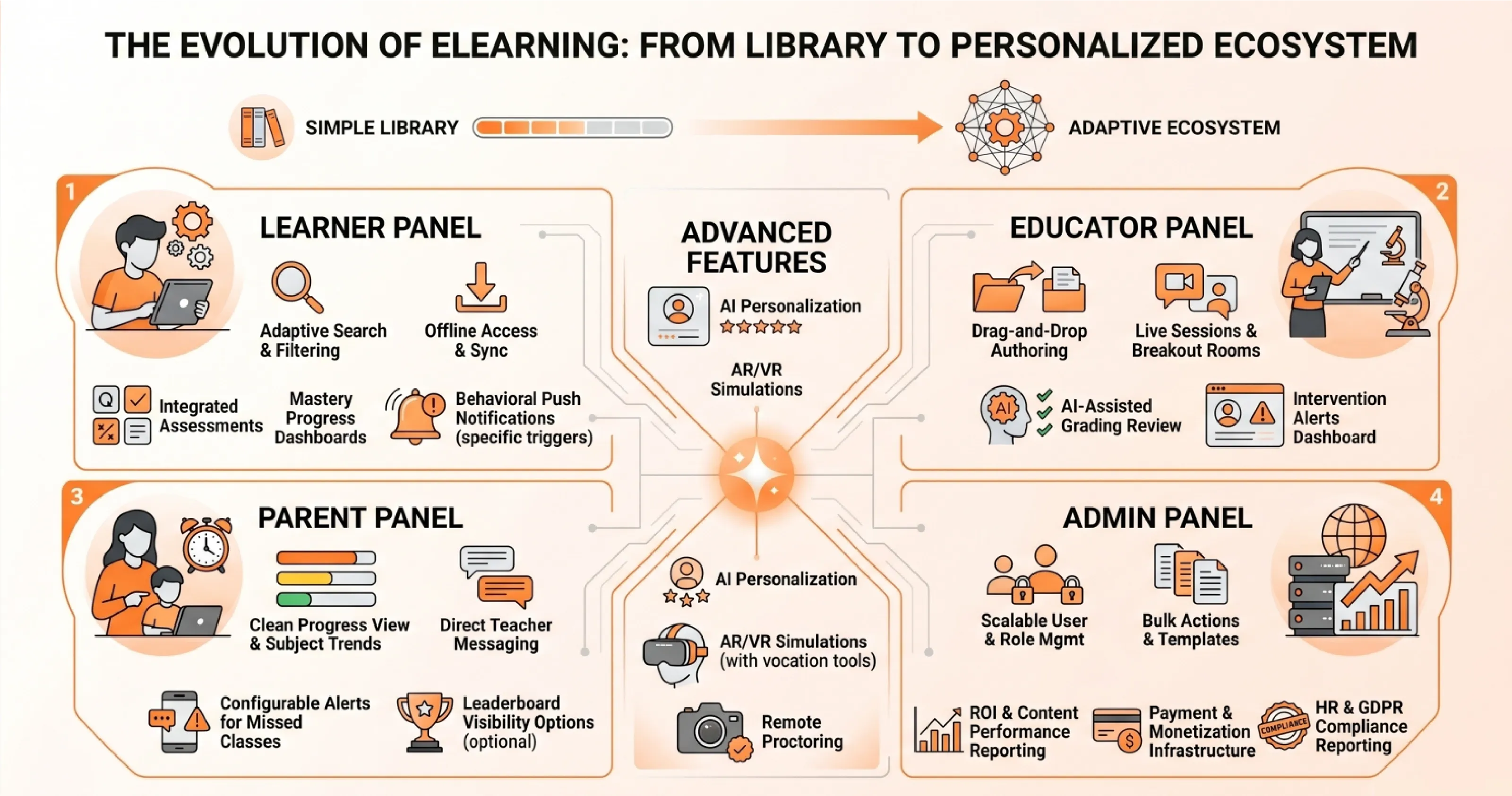
The shift that's happened over the last few years isn't subtle. eLearning apps used to be course libraries with a progress bar. Now they're expected to adapt to individual learners in real time, work offline, integrate with HR systems, and somehow keep people engaged enough to actually finish what they started. Completion rates are still a metric, but they're no longer the only one that matters.
What separates platforms that work from ones that don't usually comes down to how well the feature set maps to who's actually using it. A learner, an instructor, a parent checking on their kid's progress, and an admin managing a thousand users all need different things from the same system. Building one monolithic experience for all of them is where most platforms go wrong.
1. Learner panel
The course catalog is where most learners start, so search and filtering need to actually work. That means filtering by duration, prerequisites, instructor, and ratings, not just keyword matching against a course title.
Content delivery has to handle more than video. Learners switch between devices, lose connectivity, and have different preferences for how they absorb material. A platform that only does video streaming well is already behind. Offline access matters here too: learners should be able to download modules and have their progress sync automatically when they're back online, without having to manage that themselves.
Assessments work best when they're built into the flow rather than bolted on at the end. Auto-graded quizzes, randomized question banks, and timed tests give learners something to work against, and the instant feedback closes the loop in a way that passive content can't.
Progress dashboards tend to get overbuilt. What learners actually want is a clear picture of where they are, how much time they've put in, and what's left. Mastery indicators are useful when they're tied to something real, less so when they're just a number going up.
- Gamification is worth including, but the implementation matters. Points and badges that feel arbitrary get ignored quickly. Leaderboards work in some contexts and create anxiety in others. The mechanic needs to fit the audience.
- Discussion forums, study groups, and cohort-based chat add genuine value when there's an active user base to sustain them. For smaller deployments, they can feel empty. Worth building, but not worth over-engineering early.
- Push notifications should be driven by behavior, not just schedules. Reminding someone to study at 2 pm every day, regardless of what they've done that week, is the fastest way to get them to turn notifications off.
2. Educator panel
Instructors shouldn't need developer help to build a course. Drag-and-drop authoring tools are standard now, and anything that requires a support ticket to update a lesson is a liability.
Live sessions require reliable video, breakout-room support, shared whiteboards, and automatic recording. Low-latency matters more than feature count here. A session that lags or drops is worse than no session.
Automated grading handles objective assessments well. AI-assisted grading for written responses is improving, but still needs instructor review before it can be trusted for anything that counts toward a grade.
The most underused educator feature in most platforms is the intervention dashboard. Flagging students who are disengaging early, before they've already fallen behind, gives instructors a real chance to do something about it. Most platforms collect this data. Fewer surfaces are used usefully.
3. Parent panel (K-12 focused)
Parents need a clean view of their child's progress without having to interpret a data model. Performance by subject, attendance records, exam schedules, and grade trends should be readable without explanation. Color coding for areas of weakness is useful when it's clear what the colors actually mean.
Direct messaging between parents and teachers reduces the friction of the standard email chain. It works best when it's threaded by student and subject, so context doesn't get lost.
Leaderboard visibility for parents is a design choice that needs careful thought. Some parents find it motivating. Others find it stressful, and so do their kids. Making it optional is probably the right call.
Automated notifications should cover things parents actually need to know: missed classes, upcoming exams, and grade updates. The threshold for what triggers a notification should be configurable. A parent who gets a push alert every time their child completes a module will stop reading them.
4. Administrator panel
User management at scale means handling accounts, roles, locations, and curriculum assignments without a support ticket for every change. Bulk actions, role templates, and clear permission hierarchies save significant time.
Reporting needs to answer the questions that justify the platform's existence: are learners completing courses, are completion rates improving, which content is performing poorly, and what's the overall return on the investment? Generic dashboards that show activity without context don't answer those questions.
Payment and monetization infrastructure should handle subscriptions, one-time purchases, promo codes, and refunds without custom development. If the platform sells access to content, this is load-bearing infrastructure, not a nice-to-have.
Integrations with HR systems, CRMs, and SSO providers are usually non-negotiable for enterprise buyers. GDPR and EU AI Act compliance reporting should be built in, not
added later. Retrofitting compliance tooling after a platform is in production is expensive and disruptive.
5. Advanced features
AI personalization does two things well when implemented properly: it surfaces content learners are likely to find useful, and it adjusts difficulty based on demonstrated mastery rather than just time spent. In EdTech software development, chatbot tutors are improving, but they work best for answering common questions and explaining concepts, not for replacing instructor feedback on complex work.
AR and VR have clear use cases in vocational training, medical education, and safety simulations, where practice environments are expensive or otherwise impossible to replicate. For most other contexts, the hardware requirements and development costs still outweigh the benefits.
Remote proctoring and identity verification matter for any certification that carries real weight. Anti-cheating measures need to be robust enough to deter attempts without creating so much friction that they interfere with legitimate test-takers.

eLearning App Development Cost by Tier: MVP, Mid-Level, and Enterprise
Custom eLearning Software cost breakdown puts the 2025 development cost across three tiers, ranging from $25,000 for a basic MVP to over $300,000 for enterprise-grade deployments. Those ranges are useful planning bands, not fixed quotes. The table below maps tier to feature scope, typical development timeline, and the best-fit use case.
The most common budgeting mistake is treating the MVP cost as the total cost. An MVP that launches without content migration, WCAG accessibility compliance, API testing infrastructure, or post-launch support is not a complete product. It is a prototype with a launch date attached to it.
Why the Cheapest Quote Is Often the Most Expensive Outcome
A proposal that omits content migration, accessibility remediation, regression testing, and first-year support is not a lower-cost option. It is a deferred cost with interest. The change requests that follow a scope-light contract routinely add 20–40% to the original budget, and they arrive after the development relationship is locked in. A disciplined proposal exposes the total cost of ownership before procurement celebrates a false saving.
Integration Complexity Is the Most Under-Budgeted eLearning App Development Cost Driver.
Every integration point adds development time, testing overhead, and a new dependency in the system's failure chain.
Common integration points in enterprise eLearning platforms include
- LMS and LXP systems
- HRIS platforms for user provisioning
- Payment gateways such as Stripe, PayPal, or Razorpay,
- Video conferencing via Zoom or Microsoft Teams,
- H5P or other content authoring tools
- CRM systems
- Analytics platforms
- Enterprise identity providers using SSO, OAuth, or SAML.
Each additional integration expands the dependency chain and widens the incident blast radius if any connected system changes its API versioning or deprecates an endpoint.
How SCORM, xAPI, and LTI Standards Affect Development Budget
Content interoperability standards are a direct cost driver that most eLearning mobile app development proposals mention but do not adequately price.
SCORM 1.2 and SCORM 2004 remain the universal baseline for packaging courses and passing completion and score data to an LMS. xAPI, also known as Tin Can, expands tracking beyond course completion to include granular behavioral data across simulations, mobile activity, and offline learning.
LTI connects external tools to LMS portals and is common in higher education environments. Each standard requires separate integration testing, and older SCORM content running on modern LMS platforms adds debugging overhead that can extend sprint cycles by days.
Here is a table outlining common LMS and enterprise platform integrations along with their complexity, estimated cost addition, and implementation risk level.
Content Technology Strategy Is Product Architecture
H5P enables LMS and CMS platforms to deliver interactive videos, branching presentations, games, and assessments directly in a browser without requiring custom content-type development for every format. That matters for teams who need reusable interactive content at scale.
The governance question is harder: when individual business units define their own lesson templates, completion rules, and assessment formats, analytics fragments across the platform, and reporting becomes unreliable. Strong eLearning app development treats the content model as a product architecture decision, not an upload configuration.
Development Team Hourly Rates by Geography and What They Actually Mean for Budget
Geography is the fastest lever on eLearning app development cost, but it is not a pure cost optimization variable. Timezone overlap, communication overhead, QA governance requirements, and regulatory risk all carry a cost that doesn't appear on the hourly rate card.
Here is a comparison table of software development outsourcing regions, including hourly rates, common use cases, and associated risk considerations.
Three delivery models apply across all geographies. Time-and-material engagement offers maximum flexibility but involves variable costs. Dedicated team arrangements improve sprint consistency and knowledge retention across releases.
Outstaffing adds scalable capacity without full team overhead. The right model depends on whether the client has sufficient internal technical leadership to manage a distributed team effectively, a variable that most vendor proposals do not surface.
AI Personalization and Adaptive Learning: When to Build It and What It Adds to Budget
What AI-Powered Adaptive Learning Actually Requires
AI-powered adaptive learning is not a feature. It is a system. Building it requires structured content metadata at scale, learner state models that persist across sessions, recommendation logic with evaluation loops, privacy controls mapped to GDPR, FERPA, and COPPA obligations, and an LRS (Learning Record Store) capable of handling xAPI data at production volume.
80% of companies plan to increase spending on L&D analytics, and high-performing organizations are three times more likely to deploy advanced analytics infrastructure.
Why Most Products Should Not Build AI in Version One
The recommendation engine is only as accurate as the behavioral data it relies on. A platform with 500 active learners and three months of usage history lacks sufficient signal to train a meaningful adaptive model.
For most EdTech startups and enterprise L&D teams, better onboarding flows, cleaner course discovery, stronger progress tracking, and timely nudges based on simple completion logic create more measurable near-term value than an AI layer trained on thin data.
Here is a table outlining common AI features in modern learning platforms, including implementation requirements, estimated cost additions, and recommended build phases.
Post-Launch Operations: The eLearning App Development Cost Nobody Puts in the Proposal
Launch is the beginning of the operating phase. Learner platforms age quickly when course content formats change, device behavior shifts, browser standards update, and integration APIs version without warning. The practical budgeting framework is to separate three distinct cost categories: build cost, run cost, and growth cost.
Build cost funds the first release. Run cost protects SLA performance, covers security reviews, regression testing, dependency updates, and content maintenance. Growth cost funds new capability experiments microlearning modules, cohort tools, AI tutoring features, or enterprise reporting dashboards. Conflating these three into a single budget line produces a platform that either stagnates or degrades.
Here is a breakdown of ongoing LMS maintenance and operational cost categories, including what each area covers, estimated annual costs, and commonly overlooked considerations.
Annual maintenance at $5,000–$10,000 for small platforms. Enterprise platforms with active integrations, heavy compliance requirements, and regular content updates will run materially higher.
eLearning App Development ROI: Quantifying the Investment for Internal Stakeholders
The Business Case Data That Actually Moves Procurement
Organizations with comprehensive training programs generate 218% higher income per employee compared to those without a formal learning infrastructure, per data cited by Colossyan. Every dollar invested in manager development returns an average of $4.50 in measured productivity improvement. eLearning delivers 20–50% cost savings versus traditional instructor-led training and supports knowledge retention improvements of 25–60% when learning is distributed and reinforced through spaced repetition mechanics.
That said, the 120–430% annual ROI figures cited in industry benchmarks assume the platform generates the analytics data needed to attribute outcomes to learning activity. A platform without a functioning analytics layer, specifically one that maps learner behavior to business KPIs via xAPI and an LRS, cannot demonstrate that ROI to a CFO. The architecture decision and the business case are connected.
Here is a table highlighting common business outcomes and ROI benchmarks associated with modern digital learning and employee training platforms.
The Analytics Framework That Makes ROI Measurable
Three tiers of analytics infrastructure determine whether a platform can demonstrate its own value. Operational analytics covers completion rates, pass/fail scores, and user activity table stakes for any production platform. Experience analytics uses xAPI and an LRS to track granular behavior across simulations, offline activity, and branching scenarios.
Our data analytics solutions connect learning outcomes to operational KPIs through BI dashboards, sales performance, safety incident rates, and compliance audit scores. Only the third tier generates the evidence a CFO can act on. It is also the most expensive to build and the most commonly deferred.
Conclusion
eLearning app development is now an infrastructure decision as much as a product decision. The buyers who succeed will not chase every emerging feature or accept the lowest implementation quote. They will define the learning model, prioritize the first measurable release, choose an architecture that protects future integrations, and select a partner who can explain tradeoffs before the contract is signed.
If eLearning app development is part of your 2026 roadmap, the smartest next step is a structured evaluation process. However, if you don't want to navigate the complex, multi-vendor landscape alone, AQe Digital offers full-cycle eLearning app development expertise.